Friday, 9 November 2012

30 Window 7 Cheats

As you all know Windows 7 RC3 is launched. Here‘s a little cheat sheet I made up for some of the handy new hot key combination, many of which I‘ve become quite dependent on!

From Desktop

1. Windows Key + Tab : Aero

2. Windows Key + E : Windows Explorer is launched.

3. Windows Key + R : Run Command is launched.

4. Windows Key + F : Search

5. Windows Key + X : Mobility Center

6. Windows Key + L : Lock Computer

7. Windows Key + U : Launches Ease of Access

8. Windows Key + P : Projector

9. Windows Key + T : Cycle Super Taskbar Items

10. Windows Key + S : OneNote Screen Clipping Tool

11. Windows Key + M : Minimize All Windows

12. Windows Key + D : Show/Hide Desktop

13. Windows Key + Up : Maximize Current Window

14. Windows Key + Down : Restore Down / Minimize

15. Windows Key + Left : Tile Current Window to the Left

16. Windows Key + Right : Tile Current Windows Right

17. Windows Key + # (# is any number)

18. Windows Key + = : Launches the Magnifier

19. Windows Key + Plus : Zoom in

20. Windows Key + Minus : Zooms out

21. Windows Key + Space : Peek at the desktop

From Windows Explorer

22. Alt + Up: Go up one level 

23. Alt + Left/ Right: Back/ Forward 

24. Alt + P: Show/hide Preview Pane

Taskbar modifiers

25. Shift + Click on icon: Open a new instance 

26. Middle click on icon: Open a new instance 

27. Ctrl + Shift + Click on icon: Open a new instance with Admin privileges 

28. Shift + Right-click on icon: Show window menu 

29. Shift + Right-click on grouped icon: Menu with Restore All / Minimize All / Close All, etc. 

30. Ctrl + Click on grouped icon: Cycle between the windows (or tabs) in the group

If You Like This Post Don't Forget To Say Thanks and Share.

10 Reasons Why Pc Crashes


1. Hardware conflict :-

The number one reason why Windows crashes is hardware conflict. Each hardware device communicates to other devices through an interrupt request channel (IRQ). These are supposed to be unique for each device. For example a printer usually connects internally on IRQ 7. The keyboard usually uses IRQ 1 and the floppy disk drive IRQ 6. Each device will try to hog a single IRQ for itself. 

2. Bad Ram :-

Ram (random-access memory) problems might bring on the blue screen of death with a message saying Fatal Exception Error. A fatal error indicates a serious hardware problem. Sometimes it may mean a part is damaged and will need replacing. But a fatal error caused by Ram might be caused by a mismatch of chips. For example, mixing 70-nanosecond (70ns) Ram with 60ns Ram will usually force the computer to run the entire Ram at the slower speed. This will often crash the machine if the Ram is overworked.

3. BIOS settings :-

Every motherboard is supplied with a range of chipset settings that are decided in the factory. A common way to access these settings is to press the F2 or delete button during the first few seconds of a boot-up. 123
Once inside the BIOS, great care should be taken. It is a good idea to write down on a piece of paper all the settings that appear on the screen. That way, if you change something and the computer becomes more unstable, you will know what settings to revert to. 

4 .Hard disk drives :-

After a few weeks, the information on a hard disk drive starts to become piecemeal or fragmented. It is a good idea to defragment the hard disk every week or so, to prevent the disk from causing a screen freeze. 

5. Fatal OE exceptions and VXD errors :-

Fatal OE exception errors and VXD errors are often caused by video card problems. These can often be resolved easily by reducing the resolution of the video display. 

6. Viruses :-

Often the first sign of a virus infection is instability. Some viruses erase the boot sector of a hard drive, making it impossible to start. This is why it is a good idea to create a Windows start-up disk. 

7. Printers :-

The action of sending a document to print creates a bigger file, often called a postscript file. Printers have only a small amount of memory, called a buffer. This can be easily overloaded. Printing a document also uses a considerable amount of CPU power. This will also slow down the computer's performance. 124

8. Software :-

A common cause of computer crash is faulty or badly-installed software. Often the problem can be cured by uninstalling the software and then reinstalling it. Use Norton Uninstall or Uninstall Shield to remove an application from your system properly. This will also remove references to the programme in the System Registry and leaves the way clear for a completely fresh copy. 

9. Overheating :-

Central processing units (CPUs) are usually equipped with fans to keep them cool. If the fan fails or if the CPU gets old it may start to overheat and generate a particular kind of error called a kernel error. This is a common problem in chips that have been overclocked to operate at higher speeds than they are supposed to. One remedy is to get a bigger better fan and install it on top of the CPU. Specialist cooling fans/heatsinks are available from www.computernerd.com or www.coolit.com 

10. Power supply problems :-

With all the new construction going on around the country the steady supply of electricity has become disrupted. A power surge or spike can crash a computer as easily as a power cut.


If You Like This Post Don't  Forget To Say Thanks and Share.


Hack To Find Any Software Serial Key


Ok, this is a little trick that i usually use to find cd keys with Google. 

If you‘re looking for a serial number for Nero (for example) go to google.com and type Nero 94FBR and it'll bring it up, this works great in Google.

HOW DOES THIS WORK? 

Quite simple really. 94FBR is part of a Office 2000 Pro cd key that is widely distributed as it bypasses the activation requirements of Office 2K Pro. By searching for the product name and 94fbr, you guarantee two things. 

1)The pages that are returned are pages dealing specifically with the product you're wantinga serial for. 

2)Because 94FBR is part of a serial number, and only part of a serial number, you guarantee that any page being returned is a serial number list page.

If You Like This Post Don't Forget To Say Thanks and Share.

Thursday, 8 November 2012

Back To Top Widget Generator For Blogger

How To Add:- 

  • Go to your blogger dashboard.
  • Choose any 1 Style in widget generator.
  • Click on Generate.
  • Then Click on Add To Blogger.

Customize Blogger Labels With CSS3


How To Customize:-
Important :- Before Applying This Label set your label style to Cloud.
  • Go to your Blogger Dashboard.
  • Download Full template before making any changes in it ( Learn how).
  • Template -->> Edit HTML -->> Proceed.
  • Find  ]]></b:skin> code in Template.
  • Paste the Below Code Above/Before ]]></b:skin>
Click Here To Select All Code
  •  Save Template.

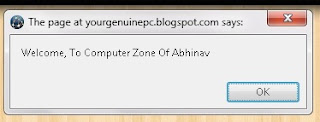
Make a Javascript Welcome Popup Box For Blogger


How To Add In Blogger:-

  • Go To Your Blogger Dashboard -->> Layout
  • Click on ADD A GADGET.
  • Select HTML/JAVASCRIPT.
  • Paste The Below Code Inside It.

<script> function MYALERT() {  alert("Welcome,To Computer Zone Of Abhinav"); } MYALERT()  </script>
 Note:- Replace The RED Color Words With Yours.

  • Save It and See Your Result.

If You Like This Post Don't Forget To Follow us and Share.


Folder Lock v7.0.5 Full with keys

Folder Lock is fast file-security software that can password-protect, lock, hide, and encrypt any number of files, folders, drives, pictures, and documents in seconds. Locked files are undeletable, unrenamable, unmovable, hidden, and inaccessible. You can lock, scramble, or encrypt depending on speed and security. Folder Lock is fully portable, so you can protect your files on USB flash drives, disks, CD-RWs, notebooks, and hard disks, and it doesn't require installation on another PC. Folder Lock protects files in Windows, DOS, and Safe modes, even when you change your OS or boot from a disk. Folder Lock doesn't let you delete its own program folder, and it can't be uninstalled without the correct password. Additional options include Stealth Mode, Hacker Attempt Monitoring, Shred files, AutoLock, Auto Shutdown PC, Lock your PC, Erase PC tracks, 256-bit Blowfish Encryption and Context Menu in Explorer.


Encrypt Files
Encrypt your personal files using 256-bit on-the-fly encryption technology totally dynamic and fool-proof.

Protect USB / CD
Convert your encrypted storages into executables and take your portable drives anywhere.

Make Wallets
Store sensitive information in encrypted form. A safe haven for private info like Credit Cards and Bank Accounts.
Run Application in complete Stealth.
Don't let anyone know you ever installed Folder Lock on your PC.

Password Security
Restrict access to various parts of the application with use of admin level master password.

Auto Protection
Set inactivity based security policy in order to secure everything when you're away from your PC.

Hack Security
Don't let hackers use dictionary attacks. Monitor, control and perform actions on incorrect password attempts.

Shred Files
Shred and permanently delete restorable files, folders and drives and even empty hard drive space.

Lock Files
Protect important files from unwanted access by blocking visibility or access to files, folders and drives.

Backup Online
Backup all your encrypted files automatically to an online storage and easily restore it back.

How To Download
  • Click the download link Below.
  • You will be redirected to the page adf.ly .
  • wait about 5 seconds until the image appears "SKIP AD".
  • After the image appears "SKIP AD", just click the "SKIP AD"  
  • Then you will redirected to new page. that page you will see download links.
  • Then use that links for download.


Skip ad Sample